QuantumNous/new-api v1.0.0-rc.34
本版本聚焦账户安全体系完善:统一敏感操作验证流程、新增审计日志与访问令牌管理,并将 Telegram 登录迁移至统一 OAuth;同时继续推进实验性插件系统,并完成多项模型/供应商管理重构与修复。
账户安全能力补齐:登录与敏感操作(注销、绑定、改密、Passkey/2FA 登记、渠道密钥查看)共用验证流程,并要求“作用域一次性证明”绑定到发起会话;已登记的 TOTP 与 Passkey 可互为备用因子。
系统访问令牌支持查看、轮换、撤销与访问历史;生成/撤销操作也需一次性验证。新增独立审计日志页面(audit.read),记录 API token 与额度操作的成功/失败、角色快照及安全元数据,并关联充值记录;模型/供应商/定价变更也会被审计。
Telegram 登录、绑定与安全验证已迁移到统一 OAuth(授权码 + PKCE + ID token)。管理员需在 BotFather Login Widget 中登记 /oauth/telegram,填写 Client ID / Client Secret 后重新启用;已有绑定保留。旧的 widget/bind 端点已移除,且自定义 OAuth provider 不能使用保留的 telegram slug。
密码存储默认改为 Argon2id,仍兼容读取历史 bcrypt 哈希;密码长度限制按 Unicode 字符计算(8–128)。
实验性插件系统(自 v1.0.0-rc.27 引入)仍处于测试阶段,包含较大架构调整,本版本仍不推荐用于生产环境 。从 v1.0.0-rc.26 或更早版本升级的用户必须重新配置所有视频模型价格 ;已配置过的无需重复。
重构模型与供应商管理:支持目录元数据校验、供应商管理、带渠道/定价清理的批量删除、模型定价快照编辑(带乐观并发控制),以及上游比率同步到价格单元格;模型页围绕供应商与模型连接组织,配有独立定价与供应商管理对话框。
修复 OpenAI Chat 能力检测:对 gpt-<n> 按主版本号识别(n >= 5),因此 gpt-6-astra 等后续版本会使用 max_completion_tokens 并丢弃不支持的 temperature/top_p/logprobs;gpt-4.1、gpt-4o、gpt-oss、gpt-image、gpt-realtime 行为不变。
升级 SQLite GORM driver,正确区分唯一索引与约束;标准化 MySQL decimal 默认值与 PostgreSQL CHAR 元数据,未变更的数据库重启时不再产生冗余 DDL。
批量拷贝 RawMessage 字段,降低请求深拷贝开销;默认折叠已完成的部署引导,不再占用仪表盘;ClickHouse driver 升级至 v2.46.0。
▸ Release Notes 英文原文(4822 字符)
> [!IMPORTANT]
> **Account Security / 账户安全功能完善**
>
> 本版本补齐账户安全能力:登录与敏感操作共用校验流程;已登记的 TOTP 与 Passkey 可作为互备因子;系统访问令牌支持查看、轮换、撤销与访问记录;新增独立审计日志。注销账户、绑定、改密、Passkey/2FA 登记与渠道密钥查看均需作用域一次性证明,并绑定到发起会话。
>
> Telegram 登录已迁到统一 OAuth。管理员须在 BotFather Login Widget 中登记 `/oauth/telegram`,并填写 Client ID / Client Secret 后重新启用;已有绑定会保留。密码存储改为默认 Argon2id(兼容历史 bcrypt),是本次安全加固的一部分,而非单独的升级动作。
>
> This release completes account security: login and sensitive operations share one verification flow; enrolled TOTP and Passkey are alternative factors; system access tokens support status, rotation, revocation, and access history; and a dedicated audit log is added. Account deletion, bindings, password changes, Passkey/2FA enrollment, and channel-key access require scoped, single-use proofs bound to the initiating session.
>
> Telegram login now uses unified OAuth. Administrators must register `/oauth/telegram` in BotFather’s Login Widget and enter the Client ID / Client Secret before re-enabling it; existing bindings are preserved. Password storage now defaults to Argon2id (with bcrypt-compatible reads) as part of this hardening, not as a standalone upgrade.
> [!WARNING]
> **Experimental Plugin System / 实验性插件系统**
>
> 自 v1.0.0-rc.27 起引入的实验性插件系统仍处于测试阶段,并涉及较大的架构调整。如遇问题,请及时反馈。
>
> 从 v1.0.0-rc.26 或更早版本升级的用户,**必须重新配置所有视频模型价格**;已完成该配置的用户无需重复操作。**本版本仍不推荐用于生产环境。**
>
> The experimental plugin system introduced in v1.0.0-rc.27 remains under testing and includes major architectural changes. Please report any issues promptly.
>
> Users upgrading from v1.0.0-rc.26 or earlier **must reconfigure all video model prices**. Users who have already completed this step do not need to repeat it. **This release is still not recommended for production use.**
## New Features
* Reworked model and vendor management: catalog metadata validation, vendor management, batch delete with channel/pricing cleanup, model pricing snapshot editing with optimistic concurrency, and upstream ratio sync with price cells. The models page is organized around vendors and model connections, with dedicated pricing and vendor-management dialogs.
* Moved account security settings to a dedicated page, with system access-token status, rotation, revocation, and access history. Generate and revoke require scoped, single-use verification.
* Added a dedicated audit log page (`audit.read`). Successful and failed API token and quota operations are recorded with role snapshots and safe metadata, correlated with top-up records. Model, vendor, and pricing mutations are also audited.
* Unified login and sensitive-operation verification: enrolled TOTP and Passkey are alternative factors. Every primary login transport is gated before a session is issued; WebAuthn requires user verification; login challenges are consumed atomically with session creation.
* Required a scoped, single-use proof for account deletion, rechecked the session inside the deletion transaction, and revoked all sessions afterward. Bindings, password changes, Passkey/2FA enrollment, and channel-key access are likewise bound to the initiating session and action.
## Security
* Completed the account-security surface: shared verification UI, session-bound proofs, last usable login method preservation, and audit of security operation outcomes. OAuth callback secrets are redacted from logs.
* Applied Unicode-aware password length limits (8–128). New passwords default to Argon2id; existing bcrypt hashes remain valid. Profiles return `has_password` from the existing SELECT without extra queries.
* Migrated Telegram login, binding, and security verification to the unified OAuth flow (authorization code + PKCE + ID tokens). Legacy widget / bind endpoints have been removed. A custom OAuth provider must not use the reserved `telegram` slug.
## Fixes and Improvements
* Fixed OpenAI Chat capability detection: match `gpt-<n>` by major version (`n >= 5`) so later generations such as `gpt-6-astra` use `max_completion_tokens` and drop unsupported `temperature` / `top_p` / `logprobs`. `gpt-4.1`, `gpt-4o`, `gpt-oss`, `gpt-image`, and `gpt-realtime` are unchanged ([#7211](https://github.com/QuantumNous/new-api/issues/7211)).
* Upgraded the SQLite GORM driver to distinguish unique indexes from constraints, and normalized equivalent MySQL decimal defaults and PostgreSQL CHAR metadata. Unchanged databases no longer emit redundant DDL on restart.
* Bulk-copied `RawMessage` fields to reduce request deep-copy cost ([#7221](https://github.com/QuantumNous/new-api/issues/7221)).
* Collapsed the completed setup guide by default so it no longer occupies the dashboard.
* Upgraded the ClickHouse driver to v2.46.0.
---
**Full Changelog**: [v1.0.0-rc.33...v1.0.0-rc.34](https://github.com/QuantumNous/new-api/compare/v1.0.0-rc.33...v1.0.0-rc.34)
▸ 主项目介绍 · QuantumNous/new-api
▸ README 原文(同步于 2026-07-20 03:47)
<div align="center">

# New API
🍥 **新一代大模型网关与AI资产管理系统**
<p align="center">
简体中文 |
<a href="./README.zh_TW.md">繁體中文</a> |
<a href="./README.md">English</a> |
<a href="./README.fr.md">Français</a> |
<a href="./README.ja.md">日本語</a>
</p>
<p align="center">
<a href="https://raw.githubusercontent.com/Calcium-Ion/new-api/main/LICENSE">
<img src="https://img.shields.io/github/license/Calcium-Ion/new-api?color=brightgreen" alt="license">
</a><!--
--><a href="https://github.com/Calcium-Ion/new-api/releases/latest">
<img src="https://img.shields.io/github/v/release/Calcium-Ion/new-api?color=brightgreen&include_prereleases" alt="release">
</a><!--
--><a href="https://hub.docker.com/r/CalciumIon/new-api">
<img src="https://img.shields.io/badge/docker-dockerHub-blue" alt="docker">
</a><!--
--><a href="https://goreportcard.com/report/github.com/Calcium-Ion/new-api">
<img src="https://goreportcard.com/badge/github.com/Calcium-Ion/new-api" alt="GoReportCard">
</a>
</p>
<p align="center">
<a href="https://trendshift.io/repositories/20180" target="_blank">
<img src="https://trendshift.io/api/badge/repositories/20180" alt="QuantumNous%2Fnew-api | Trendshift" style="width: 250px; height: 55px;" width="250" height="55"/>
</a>
<br>
<a href="https://hellogithub.com/repository/QuantumNous/new-api" target="_blank">
<img src="https://api.hellogithub.com/v1/widgets/recommend.svg?rid=539ac4217e69431684ad4a0bab768811&claim_uid=tbFPfKIDHpc4TzR" alt="Featured|HelloGitHub" style="width: 250px; height: 54px;" width="250" height="54" />
</a><!--
--><a href="https://www.producthunt.com/products/new-api/launches/new-api?embed=true&utm_source=badge-featured&utm_medium=badge&utm_campaign=badge-new-api" target="_blank" rel="noopener noreferrer">
<img src="https://api.producthunt.com/widgets/embed-image/v1/featured.svg?post_id=1047693&theme=light&t=1769577875005" alt="New API - All-in-one AI asset management gateway. | Product Hunt" style="width: 250px; height: 54px;" width="250" height="54" />
</a>
</p>
<p align="center">
<a href="#-快速开始">快速开始</a> •
<a href="#-主要特性">主要特性</a> •
<a href="#-部署">部署</a> •
<a href="#-文档">文档</a> •
<a href="#-帮助支持">帮助</a>
</p>
</div>
## 📝 项目说明
> [!IMPORTANT]
> - 本项目仅面向合法授权的 AI API 网关、组织内部鉴权、多模型管理、用量统计、成本核算和私有化部署场景。
> - 使用者必须合法取得上游 API Key、账号、模型服务或接口权限,并遵守上游服务条款及适用法律法规。
> - 使用者应确保其使用方式符合上游服务条款及适用法律法规。
> - 面向公众提供生成式人工智能服务时,使用者应遵守[《生成式人工智能服务管理暂行办法》](http://www.cac.gov.cn/2023-07/13/c_1690898327029107.htm)等监管要求,自行完成所在司法辖区要求的备案、许可、内容安全、实名、日志留存、税务和上游授权等合规义务。
---
## 🤝 我们信任的合作伙伴
<p align="center">
<em>排名不分先后</em>
</p>
<p align="center">
<a href="https://www.cherry-ai.com/" target="_blank">
<img src="./docs/images/cherry-studio.png" alt="Cherry Studio" height="80" />
</a><!--
--><a href="https://github.com/iOfficeAI/AionUi/" target="_blank">
<img src="./docs/images/aionui.png" alt="Aion UI" height="80" />
</a><!--
--><a href="https://bda.pku.edu.cn/" target="_blank">
<img src="./docs/images/pku.png" alt="北京大学" height="80" />
</a><!--
--><a href="https://www.compshare.cn/?ytag=GPU_yy_gh_newapi" target="_blank">
<img src="./docs/images/ucloud.png" alt="UCloud 优刻得" height="80" />
</a><!--
--><a href="https://www.aliyun.com/" target="_blank">
<img src="./docs/images/aliyun.png" alt="阿里云" height="80" />
</a><!--
--><a href="https://io.net/" target="_blank">
<img src="./docs/images/io-net.png" alt="IO.NET" height="80" />
</a>
</p>
---
## 🙏 特别鸣谢
<p align="center">
<a href="https://www.jetbrains.com/?from=new-api" target="_blank">
<img src="https://resources.jetbrains.com/storage/products/company/brand/logos/jb_beam.png" alt="JetBrains Logo" width="120" />
</a>
</p>
<p align="center">
<strong>感谢 <a href="https://www.jetbrains.com/?from=new-api">JetBrains</a> 为本项目提供免费的开源开发许可证</strong>
</p>
---
## 🚀 快速开始
### 使用 Docker Compose(推荐)
```bash
# 克隆项目
git clone https://github.com/QuantumNous/new-api.git
cd new-api
# 编辑 docker-compose.yml 配置
nano docker-compose.yml
# 启动服务
docker-compose up -d
```
<details>
<summary><strong>使用 Docker 命令</strong></summary>
```bash
# 拉取最新镜像
docker pull calciumion/new-api:latest
# 使用 SQLite(默认)
docker run --name new-api -d --restart always \
-p 3000:3000 \
-e TZ=Asia/Shanghai \
-v ./data:/data \
calciumion/new-api:latest
# 使用 MySQL
docker run --name new-api -d --restart always \
-p 3000:3000 \
-e SQL_DSN="root:123456@tcp(localhost:3306)/oneapi" \
-e TZ=Asia/Shanghai \
-v ./data:/data \
calciumion/new-api:latest
```
> **💡 提示:** `-v ./data:/data` 会将数据保存在当前目录的 `data` 文件夹中,你也可以改为绝对路径如 `-v /your/custom/path:/data`
</details>
---
🎉 部署完成后,访问 `http://localhost:3000` 即可使用!
> [!WARNING]
> 将本项目作为面向公众的生成式 AI 服务或 API 转售服务运营时,使用者应先完成备案、内容安全、实名、日志留存、税务、支付和上游授权等合规义务。
📖 更多部署方式请参考 [部署指南](https://docs.newapi.pro/zh/docs/installation)
---
## 📚 文档
<div align="center">
### 📖 [官方文档](https://docs.newapi.pro/zh/docs) | [](https://deepwiki.com/QuantumNous/new-api)
</div>
**快速导航:**
| 分类 | 链接 |
|------|------|
| 🚀 部署指南 | [安装文档](https://docs.newapi.pro/zh/docs/installation) |
| ⚙️ 环境配置 | [环境变量](https://docs.newapi.pro/zh/docs/installation/config-maintenance/environment-variables) |
| 📡 接口文档 | [API 文档](https://docs.newapi.pro/zh/docs/api) |
| ❓ 常见问题 | [FAQ](https://docs.newapi.pro/zh/docs/support/faq) |
| 💬 社区交流 | [交流渠道](https://docs.newapi.pro/zh/docs/support/community-interaction) |
---
## ✨ 主要特性
> 详细特性请参考 [特性说明](https://docs.newapi.pro/zh/docs/guide/wiki/basic-concepts/features-introduction)
### 🎨 核心功能
| 特性 | 说明 |
|------|------|
| 🎨 全新 UI | 现代化的用户界面设计 |
| 🌍 多语言 | 支持中文、英文、法语、日语 |
| 🔄 数据兼容 | 完全兼容原版 One API 数据库 |
| 📈 数据看板 | 可视化控制台与统计分析 |
| 🔒 权限管理 | 令牌分组、模型限制、用户管理 |
### 💰 授权用量与成本管理
- ✅ 合法授权场景下的内部充值与额度分配(易支付、Stripe)
- ✅ 组织内按次、按量或缓存命中成本核算
- ✅ 支持 OpenAI、Azure、DeepSeek、Claude、Qwen 等模型的缓存计费统计
- ✅ 面向内部管理或企业客户的灵活计费策略配置
### 🔐 授权与安全
- 😈 Discord 授权登录
- 🤖 LinuxDO 授权登录
- 📱 Telegram 授权登录
- 🔑 OIDC 统一认证
- 🔍 Key 查询使用额度(配合 [new-api-key-tool](https://github.com/Calcium-Ion/new-api-key-tool))
### 🚀 高级功能
**API 格式支持:**
- ⚡ [OpenAI Responses](https://docs.newapi.pro/zh/docs/api/ai-model/chat/openai/create-response)
- ⚡ [OpenAI Realtime API](https://docs.newapi.pro/zh/docs/api/ai-model/realtime/create-realtime-session)(含 Azure)
- ⚡ [Claude Messages](https://docs.newapi.pro/zh/docs/api/ai-model/chat/create-message)
- ⚡ [Google Gemini](https://doc.newapi.pro/api/google-gemini-chat)
- 🔄 [Rerank 模型](https://docs.newapi.pro/zh/docs/api/ai-model/rerank/create-rerank)(Cohere、Jina)
**智能路由:**
- ⚖️ 渠道加权随机
- 🔄 失败自动重试
- 🚦 用户级别模型限流
**格式转换:**
- 🔄 **OpenAI Compatible ⇄ Claude Messages**
- 🔄 **OpenAI Compatible → Google Gemini**
- 🔄 **Google Gemini → OpenAI Compatible** - 仅支持文本,暂不支持函数调用
- 🚧 **OpenAI Compatible ⇄ OpenAI Responses** - 开发中
- 🔄 **思考转内容功能**
**Reasoning Effort 支持:**
<details>
<summary>查看详细配置</summary>
**OpenAI 系列模型:**
- `o3-mini-high` - High reasoning effort
- `o3-mini-medium` - Medium reasoning effort
- `o3-mini-low` - Low reasoning effort
- `gpt-5-high` - High reasoning effort
- `gpt-5-medium` - Medium reasoning effort
- `gpt-5-low` - Low reasoning effort
**Claude 思考模型:**
- `claude-3-7-sonnet-20250219-thinking` - 启用思考模式
**Google Gemini 系列模型:**
- `gemini-2.5-flash-thinking` - 启用思考模式
- `gemini-2.5-flash-nothinking` - 禁用思考模式
- `gemini-2.5-pro-thinking` - 启用思考模式
- `gemini-2.5-pro-thinking-128` - 启用思考模式,并设置思考预算为128tokens
- 也可以直接在 Gemini 模型名称后追加 `-low` / `-medium` / `-high` 来控制思考力度(无需再设置思考预算后缀)
</details>
---
## 🤖 模型支持
> 详情请参考 [接口文档 - 网关接口](https://docs.newapi.pro/zh/docs/api)
| 模型类型 | 说明 | 文档 |
|---------|------|------|
| 🤖 OpenAI-Compatible | OpenAI 兼容模型 | [文档](https://docs.newapi.pro/zh/docs/api/ai-model/chat/openai/createchatcompletion) |
| 🤖 OpenAI Responses | OpenAI Responses 格式 | [文档](https://docs.newapi.pro/zh/docs/api/ai-model/chat/openai/createresponse) |
| 🎨 Midjourney-Proxy | [Midjourney-Proxy(Plus)](https://github.com/novicezk/midjourney-proxy) | [文档](https://doc.newapi.pro/api/midjourney-proxy-image) |
| 🎵 Suno-API | [Suno API](https://github.com/Suno-API/Suno-API) | [文档](https://doc.newapi.pro/api/suno-music) |
| 🔄 Rerank | Cohere、Jina | [文档](https://docs.newapi.pro/zh/docs/api/ai-model/rerank/create-rerank) |
| 💬 Claude | Messages 格式 | [文档](https://docs.newapi.pro/zh/docs/api/ai-model/chat/createmessage) |
| 🌐 Gemini | Google Gemini 格式 | [文档](https://docs.newapi.pro/zh/docs/api/ai-model/chat/gemini/geminirelayv1beta) |
| 🔧 Dify | ChatFlow 模式 | - |
| 🎯 自定义上游 | 支持配置合法授权的上游接口地址 | - |
### 📡 支持的接口
<details>
<summary>查看完整接口列表</summary>
- [聊天接口 (Chat Completions)](https://docs.newapi.pro/zh/docs/api/ai-model/chat/openai/createchatcompletion)
- [响应接口 (Responses)](https://docs.newapi.pro/zh/docs/api/ai-model/chat/openai/createresponse)
- [图像接口 (Image)](https://docs.newapi.pro/zh/docs/api/ai-model/images/openai/post-v1-images-generations)
- [音频接口 (Audio)](https://docs.newapi.pro/zh/docs/api/ai-model/audio/openai/create-transcription)
- [视频接口 (Video)](https://docs.newapi.pro/zh/docs/api/ai-model/audio/openai/createspeech)
- [嵌入接口 (Embeddings)](https://docs.newapi.pro/zh/docs/api/ai-model/embeddings/createembedding)
- [重排序接口 (Rerank)](https://docs.newapi.pro/zh/docs/api/ai-model/rerank/creatererank)
- [实时对话 (Realtime)](https://docs.newapi.pro/zh/docs/api/ai-model/realtime/createrealtimesession)
- [Claude 聊天](https://docs.newapi.pro/zh/docs/api/ai-model/chat/createmessage)
- [Google Gemini 聊天](https://docs.newapi.pro/zh/docs/api/ai-model/chat/gemini/geminirelayv1beta)
</details>
---
## 🚢 部署
> [!TIP]
> **最新版 Docker 镜像:** `calciumion/new-api:latest`
### 📋 部署要求
| 组件 | 要求 |
|------|------|
| **本地数据库** | SQLite(Docker 需挂载 `/data` 目录)|
| **远程数据库** | MySQL ≥ 5.7.8 或 PostgreSQL ≥ 9.6 |
| **容器引擎** | Docker / Docker Compose |
| **系统架构** | 仅支持 64 位系统(amd64 / arm64),不支持 32 位系统 |
### ⚙️ 环境变量配置
<details>
<summary>常用环境变量配置</summary>
| 变量名 | 说明 | 默认值 |
|--------|--------------------------------------------------------------|--------|
| `SESSION_SECRET` | 会话密钥(多机部署必须) | - |
| `CRYPTO_SECRET` | 加密密钥(Redis 必须) | - |
| `SQL_DSN` | 数据库连接字符串 | - |
| `REDIS_CONN_STRING` | Redis 连接字符串 | - |
| `STREAMING_TIMEOUT` | 流式超时时间(秒) | `300` |
| `STREAM_SCANNER_MAX_BUFFER_MB` | 流式扫描器单行最大缓冲(MB),图像生成等超大 `data:` 片段(如 4K 图片 base64)需适当调大 | `64` |
| `MAX_REQUEST_BODY_MB` | 请求体最大大小(MB,**解压后**计;防止超大请求/zip bomb 导致内存暴涨),超过将返回 `413` | `32` |
| `AZURE_DEFAULT_API_VERSION` | Azure API 版本 | `2025-04-01-preview` |
| `ERROR_LOG_ENABLED` | 错误日志开关 | `false` |
| `PYROSCOPE_URL` | Pyroscope 服务地址 | - |
| `PYROSCOPE_APP_NAME` | Pyroscope 应用名 | `new-api` |
| `PYROSCOPE_BASIC_AUTH_USER` | Pyroscope Basic Auth 用户名 | - |
| `PYROSCOPE_BASIC_AUTH_PASSWORD` | Pyroscope Basic Auth 密码 | - |
| `PYROSCOPE_MUTEX_RATE` | Pyroscope mutex 采样率 | `5` |
| `PYROSCOPE_BLOCK_RATE` | Pyroscope block 采样率 | `5` |
| `HOSTNAME` | Pyroscope 标签里的主机名 | `new-api` |
📖 **完整配置:** [环境变量文档](https://docs.newapi.pro/zh/docs/installation/config-maintenance/environment-variables)
</details>
### 🔧 部署方式
<details>
<summary><strong>方式 1:Docker Compose(推荐)</strong></summary>
```bash
# 克隆项目
git clone https://github.com/QuantumNous/new-api.git
cd new-api
# 编辑配置
nano docker-compose.yml
# 启动服务
docker-compose up -d
```
</details>
<details>
<summary><strong>方式 2:Docker 命令</strong></summary>
**使用 SQLite:**
```bash
docker run --name new-api -d --restart always \
-p 3000:3000 \
-e TZ=Asia/Shanghai \
-v ./data:/data \
calciumion/new-api:latest
```
**使用 MySQL:**
```bash
docker run --name new-api -d --restart always \
-p 3000:3000 \
-e SQL_DSN="root:123456@tcp(localhost:3306)/oneapi" \
-e TZ=Asia/Shanghai \
-v ./data:/data \
calciumion/new-api:latest
```
> **💡 路径说明:**
> - `./data:/data` - 相对路径,数据保存在当前目录的 data 文件夹
> - 也可使用绝对路径,如:`/your/custom/path:/data`
</details>
<details>
<summary><strong>方式 3:宝塔面板</strong></summary>
1. 安装宝塔面板(≥ 9.2.0 版本)
2. 在应用商店搜索 **New-API**
3. 一键安装
📖 [图文教程](./docs/installation/BT.md)
</details>
### ⚠️ 多机部署注意事项
> [!WARNING]
> - **必须设置** `SESSION_SECRET` - 否则登录状态不一致
> - **公用 Redis 必须设置** `CRYPTO_SECRET` - 否则数据无法解密
### 🔄 渠道重试与缓存
**重试配置:** `设置 → 运营设置 → 通用设置 → 失败重试次数`
**缓存配置:**
- `REDIS_CONN_STRING`:Redis 缓存(推荐)
- `MEMORY_CACHE_ENABLED`:内存缓存
---
## 🔗 相关项目
### 上游项目
| 项目 | 说明 |
|------|------|
| [One API](https://github.com/songquanpeng/one-api) | 原版项目基础 |
| [Midjourney-Proxy](https://github.com/novicezk/midjourney-proxy) | Midjourney 接口支持 |
### 配套工具
| 项目 | 说明 |
|------|------|
| [new-api-key-tool](https://github.com/Calcium-Ion/new-api-key-tool) | Key 额度查询工具 |
| [new-api-horizon](https://github.com/Calcium-Ion/new-api-horizon) | New API 高性能优化版 |
---
## 💬 帮助支持
### 📖 文档资源
| 资源 | 链接 |
|------|------|
| 📘 常见问题 | [FAQ](https://docs.newapi.pro/zh/docs/support/faq) |
| 💬 社区交流 | [交流渠道](https://docs.newapi.pro/zh/docs/support/community-interaction) |
| 🐛 反馈问题 | [问题反馈](https://docs.newapi.pro/zh/docs/support/feedback-issues) |
| 📚 完整文档 | [官方文档](https://docs.newapi.pro/zh/docs) |
### 🤝 贡献指南
欢迎各种形式的贡献!
- 🐛 报告 Bug
- 💡 提出新功能
- 📝 改进文档
- 🔧 提交代码
---
## 📜 许可证
本项目采用 [GNU Affero 通用公共许可证 v3.0 (AGPLv3)](./LICENSE) 授权。
本项目为开源项目,在 [One API](https://github.com/songquanpeng/one-api)(MIT 许可证)的基础上进行二次开发。
如果您所在的组织政策不允许使用 AGPLv3 许可的软件,或您希望规避 AGPLv3 的开源义务,请发送邮件至:[support@quantumnous.com](mailto:support@quantumnous.com)
---
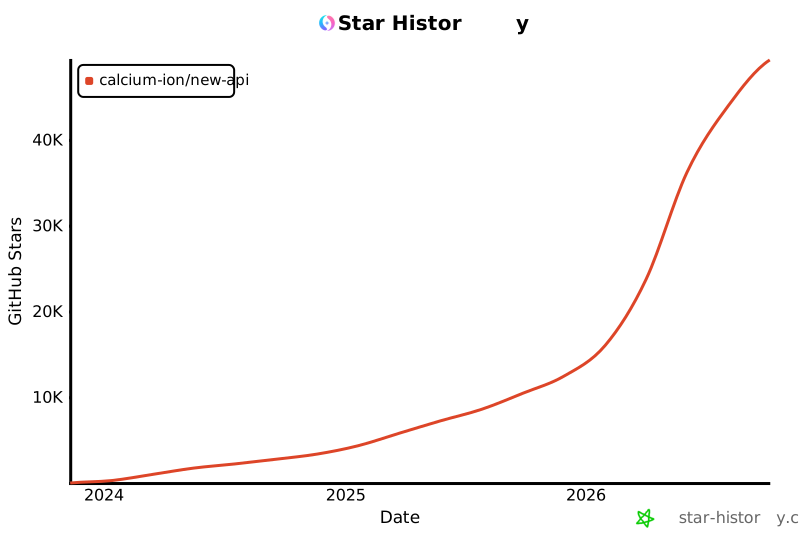
## 🌟 Star History
<div align="center">
[](https://star-history.com/#Calcium-Ion/new-api&Date)
</div>
---
<div align="center">
### 💖 感谢使用 New API
如果这个项目对你有帮助,欢迎给我们一个 ⭐️ Star!
**[官方文档](https://docs.newapi.pro/zh/docs)** • **[问题反馈](https://github.com/Calcium-Ion/new-api/issues)** • **[最新发布](https://github.com/Calcium-Ion/new-api/releases)**
<sub>Built with ❤️ by QuantumNous</sub>
</div>
▸ 中文总结(生成于 2026-08-02 16:44)
QuantumNous/new-api 项目介绍
该项目是一个统一的大模型网关与 AI 资产管理平台 ,由 QuantumNous 维护,基于开源项目 One API 二次开发,核心定位是将多种大模型服务聚合到一个入口,并以统一/可转换的 API 格式对外提供,同时承担用量统计、成本核算、权限管理等企业级功能。
这个项目是做什么的
提供统一的 AI 模型接入网关,实现多模型聚合与分发 。它支持将各种主流 LLM 的请求转换为 OpenAI、Claude、Gemini 等兼容格式,让客户端可以用一套 API 访问不同厂商的模型。
面向个人和企业 提供集中的模型管理能力,包括令牌(Token)分组、模型限制、用户管理、用量统计、成本核算、充值额度分配等。
可用于合法授权场景下的 API 网关、组织内部鉴权、多模型管理、用量统计、成本核算和私有化部署。
解决什么问题
解决多家 AI 模型 API 格式不统一、管理分散的问题,通过一个网关屏蔽底层差异。
解决企业内部多模型使用的鉴权、配额、计费、审计问题。
解决原版 One API 功能不足的问题,提供更现代 UI、更多模型格式支持、更细粒度的计费策略。
核心技术架构与实现思路
基于 Go 语言 开发,兼容原版 One API 的数据库结构,可平滑迁移。
支持 SQLite 作为默认本地数据库,也支持 MySQL ≥ 5.7.8 和 PostgreSQL ≥ 9.6 ,并可通过环境变量切换。
支持 Redis 作为分布式缓存和多机部署的必要组件(需设置 REDIS_CONN_STRING)。
以 Docker / Docker Compose 为主要部署方式,也支持宝塔面板一键安装,仅支持 64 位系统(amd64 / arm64)。
内置智能路由 :渠道加权随机、失败自动重试、用户级别模型限流。
值得关注的技术亮点
多格式转换能力 :
OpenAI Compatible ⇄ Claude Messages
OpenAI Compatible → Google Gemini
Google Gemini → OpenAI Compatible(仅文本,暂不支持函数调用)
OpenAI Compatible ⇄ OpenAI Responses(开发中)
支持“思考转内容”功能
API 格式覆盖广 :支持 OpenAI Chat/Responses/Realtime(含 Azure)、Claude Messages、Google Gemini、Rerank(Cohere、Jina)、Midjourney-Proxy、Suno-API、Dify 等。Reasoning Effort 支持 :可通过模型名后缀控制推理强度,如 o3-mini-high、gpt-5-low、claude-3-7-sonnet-20250219-thinking、gemini-2.5-pro-thinking 等。完整的环境变量配置体系 :包括 SESSION_SECRET(多机必需)、CRYPTO_SECRET(Redis 必需)、SQL_DSN、STREAMING_TIMEOUT、MAX_REQUEST_BODY_MB(防 zip bomb)等。授权与安全 :支持 Discord、LinuxDO、Telegram、OIDC 认证登录,并可通过配套工具 new-api-key-tool 查询 Key 额度。成本管理细致 :支持 OpenAI、Azure、DeepSeek、Claude、Qwen 等模型的缓存计费统计,支持按次、按量或缓存命中成本核算。开源协议与上游关系 :项目基于 One API(MIT 许可证)二次开发,本项目采用 AGPLv3 许可证。
快速部署示例(Docker)
# 使用 SQLite
docker run --name new-api -d --restart always \
  -p 3000:3000 \
  -e TZ=Asia/Shanghai \
  -v ./data:/data \
  calciumion/new-api:latest

# 使用 MySQL
docker run --name new-api -d --restart always \
  -p 3000:3000 \
  -e SQL_DSN="root:123456@tcp(localhost:3306)/oneapi" \
  -e TZ=Asia/Shanghai \
  -v ./data:/data \
  calciumion/new-api:latest
部署完成后访问 http://localhost:3000 即可使用。
⋯ 已提交 AI 生成中文总结,预计需要 10~30 秒,请稍候…
重新生成中文总结