▸ README 原文(同步于 2026-07-20 03:47)
<div align="center">
# CC Switch
### The All-in-One Manager for Claude Code, Claude Desktop, Codex, Gemini CLI, Grok Build, OpenCode, OpenClaw & Hermes Agent
[](https://github.com/farion1231/cc-switch/releases)
[](https://github.com/farion1231/cc-switch/releases)
[](https://tauri.app/)
[](https://github.com/farion1231/cc-switch/releases/latest)
<a href="https://trendshift.io/repositories/15372" target="_blank"><img src="https://trendshift.io/api/badge/repositories/15372" alt="farion1231%2Fcc-switch | Trendshift" style="width: 250px; height: 55px;" width="250" height="55"/></a>
<a href="https://www.star-history.com/#farion1231/cc-switch&Date"><picture><source media="(prefers-color-scheme: dark)" srcset="https://api.star-history.com/badge?repo=farion1231/cc-switch&theme=dark" /><img alt="Star History Rank" src="https://api.star-history.com/badge?repo=farion1231/cc-switch" width="196" height="55" /></picture></a>
### 🌐 The Only Official Website: **[ccswitch.io](https://ccswitch.io)**
English | [中文](README_ZH.md) | [日本語](README_JA.md) | [Deutsch](README_DE.md) | [Changelog](CHANGELOG.md)
</div>
## ❤️Sponsor
> [Want to appear here?](mailto:farion1231@gmail.com)
<details open>
<summary>Click to collapse</summary>
[](https://platform.kimi.ai?aff=cc-switch)
Kimi K2.7 Code is an open-source, coding-focused agentic model developed by Moonshot AI. It delivers stronger coding and agent performance, with substantial improvements in real-world long-horizon coding tasks. These gains translate into higher end-to-end task success rates across complex software engineering workflows. K2.7 Code also improves reasoning efficiency, reducing thinking-token usage by approximately 30% compared with K2.6. **[Click here to start using Kimi](https://platform.kimi.ai?aff=cc-switch)**
Doing mostly coding work? Try the **[Kimi For Coding plan](https://www.kimi.com/code/?aff=cc-switch)** — a subscription service built for coding!
---
<table>
<tr>
<td width="180"><a href="https://www.packyapi.com/register?aff=cc-switch"><img src="assets/partners/logos/packycode.png" alt="PackyCode" width="150"></a></td>
<td>Thanks to PackyCode for sponsoring this project! PackyCode is a reliable and efficient API relay service provider, offering relay services for Claude Code, Codex, Gemini, and more. PackyCode provides special discounts for our software users: register using <a href="https://www.packyapi.com/register?aff=cc-switch">this link</a> and enter the "cc-switch" promo code during first recharge to get 10% off.</td>
</tr>
<tr>
<td width="180"><a href="https://aigocode.com/invite/CC-SWITCH"><img src="assets/partners/logos/aigocode.png" alt="AIGoCode" width="150"></a></td>
<td>Thanks to AIGoCode for sponsoring this project! AIGoCode is an all-in-one platform that integrates Claude Code, Codex, and the latest Gemini models, providing you with stable, efficient, and highly cost-effective AI coding services. The platform offers flexible subscription plans, zero risk of account suspension, direct access with no VPN required, and lightning-fast responses. AIGoCode has prepared a special benefit for CC Switch users: if you register via <a href="https://aigocode.com/invite/CC-SWITCH">this link</a>, you'll receive an extra 10% bonus credit on your first top-up!</td>
</tr>
<tr>
<td width="180"><a href="https://www.aicodemirror.com/register?invitecode=9915W3"><img src="assets/partners/logos/aicodemirror.jpg" alt="AICodeMirror" width="150"></a></td>
<td>Thanks to AICodeMirror for sponsoring this project! AICodeMirror provides official high-stability relay services for Claude Code / Codex / Gemini CLI, with enterprise-grade concurrency, fast invoicing, and 24/7 dedicated technical support.
Claude Code / Codex / Gemini official channels at 38% / 2% / 9% of original price, with extra discounts on top-ups! AICodeMirror offers special benefits for CC Switch users: register via <a href="https://www.aicodemirror.com/register?invitecode=9915W3">this link</a> to enjoy 20% off your first top-up, and enterprise customers can get up to 25% off!</td>
</tr>
<tr>
<td width="180"><a href="https://www.shengsuanyun.com/?from=CH_4HHXMRYF"><img src="assets/partners/logos/shengsuanyun.png" alt="Shengsuanyun" width="150"></a></td>
<td>Thanks to Shengsuanyun for sponsoring this project! Shengsuanyun is a super factory serving AI Native Teams — an industrial-grade AI task parallel execution platform. Its model marketplace aggregates Claude, ChatGPT, Gemini, and other domestic and international LLM and multimedia model capabilities with direct supply. Absolutely no reverse engineering or dilution — platform-wide model SLA availability reaches 99.7%, with <a href="https://watch.shengsuanyun.com/status/shengsuanyun">monitoring dashboards</a> showing green across the board. It also offers enterprise-grade custom gateways for fine-grained team cost and permission management, smart routing, security protection, and BYOK (Bring Your Own Key) hosting. The platform charges on a pay-per-use and tokens plan (coming soon) basis, with invoicing available. Register via <a href="https://www.shengsuanyun.com/?from=CH_4HHXMRYF">this link</a> as a new user to receive ¥10 in credits plus a 10% bonus on your first top-up.</td>
</tr>
<tr>
<td width="180"><a href="https://pateway.ai/?ch=etzpm8&aff=WB6M6F67#/"><img src="assets/partners/logos/pateway.png" alt="PatewayAI" width="150"></a></td>
<td>Thanks to PatewayAI for sponsoring this project! PatewayAI is an API relay service provider built for heavy AI developers, focused on directly relaying official high-quality model APIs. It offers the full Claude lineup and the Codex series, 100% sourced from official channels — no dilution, no fakes, verification welcome. Billing is transparent and every token-level invoice can be audited line by line.
It also supports enterprise-grade concurrency and provides a dedicated management platform for enterprise customers — formal contracts and invoicing are available; visit the official website for contact details.
Register now via <a href="https://pateway.ai/?ch=etzpm8&aff=WB6M6F67#/">this link</a> to receive $3 in trial credit. Top-ups go as low as 60% of the original price, with a two-way referral bonus of up to $150!</td>
</tr>
<tr>
<td width="180"><a href="https://teamorouter.com/?utm_source=cc_switch&utm_medium=referral&utm_campaign=ai_directory"><img src="assets/partners/logos/TeamoRouter-banner.png" alt="TeamoRouter" width="150"></a></td>
<td>Thanks to TeamoRouter for sponsoring this project! TeamoRouter is an enterprise-grade Agentic LLM gateway built for developers, AI teams, and businesses. Without requiring any subscriptions, it lets you access Claude Code, Codex, Gemini CLI, OpenAI Codex, and other popular AI agents through a single unified API, while offering API pricing at discounts of up to 90%.
Unlike typical API relay services, TeamoRouter aggregates hundreds of official model providers and trusted infrastructure partners, including OpenAI, Anthropic, Vertex, Azure, and AWS bedrock. Every provider is verified for 100% Agent protocol compatibility, cache performance, and request traceability, ensuring stable quality instead of reverse-engineered or diluted endpoints. The platform delivers near-official TTFT, 99.6% SLA, enterprise-scale throughput up to 5,000 QPM, and industry-leading cache hit rates that dramatically reduce token costs for long-running agent workflows.
TeamoRouter also offers enterprise features including centralized billing, team management, BYOK, smart routing, usage analytics, dynamic provider optimization, and dedicated support. For an even simpler experience, Teamo Desktop lets you use Claude Code, Codex, Gemini CLI, and other popular AI agents with one-click setup—no API key management or manual gateway configuration required. Register via <a href="https://teamorouter.com/?utm_source=cc_switch&utm_medium=referral&utm_campaign=ai_directory">this link</a> as a new user to receive 10% off your first top-up.</td>
</tr>
<tr>
<td width="180"><a href="https://zetaapi.ai/go/ccs"><img src="assets/partners/logos/zetaapi-banner.png" alt="ZetaAPI" width="150"></a></td>
<td>Thanks to ZetaAPI for sponsoring this project! ZetaAPI focuses on real model fidelity, no watered-down responses, no quality degradation, and pricing as low as 35% of official rates. The platform does not mix traffic, secretly replace models with lower-quality alternatives, or use fake model routing. It supports Claude Code, Codex, Gemini, ChatGPT, and other mainstream AI models, helping users significantly reduce API costs while maintaining reliable model quality. At the same time, ZetaAPI provides enterprise-grade SLA-backed stability, standard API compatibility, one API key for multiple models, fast integration, and pay-as-you-go billing, making it suitable for AI products, coding agents, internal business tools, customer service systems, content generation, and automation workflows. If any model is verified to be inconsistent with its stated quality, ZetaAPI backs it with a 10x compensation guarantee, giving users a more stable, transparent, and trustworthy experience. Register via <a href="https://zetaapi.ai/go/ccs">this link</a> and use the promo code CC-SWITCH during your first recharge to enjoy an exclusive 10% discount on your first top-up, just for CC Switch users!</td>
</tr>
<tr>
<td width="180"><a href="https://www.byteplus.com/en/product/modelark?utm_campaign=hw&utm_content=ccswitch&utm_medium=devrel_tool_web&utm_source=OWO&utm_term=ccswitch"><img src="assets/partners/logos/byteplus.png" alt="BytePlus" width="150"></a></td>
<td>Thanks to Dola seed for sponsoring this project! Dola Seed 2.0 is a full‑modal general large model independently developed by ByteDance for the global market. Built on a unified multimodal architecture, it supports joint understanding and generation of text, images, audio, and video. It natively enables agent collaboration, with strong reasoning, long‑task execution, tool integration, and coding capabilities. It is widely applicable to smart cockpits, personal assistants, education, customer support, marketing, retail, and other scenarios. It excels in multimodal perception, end‑to‑end complex task delivery, stable interaction, and data security, and is readily accessible and deployable via the ModelArk platform.Register via <a href="https://www.byteplus.com/en/product/modelark?utm_campaign=hw&utm_content=ccswitch&utm_medium=devrel_tool_web&utm_source=OWO&utm_term=ccswitch">this link</a> to get 500,000 tokens of free inference quota per model.<a href="https://www.volcengine.com/activity/ai618?utm_campaign=hw&utm_content=hw&utm_medium=devrel_tool_web&utm_source=OWO&utm_term=ccswitch"> >>中国大陆地区的开发者请点击这里</a></td>
</tr>
<tr>
<td width="180"><a href="https://cloud.siliconflow.cn/i/YflgU2Ve"><img src="assets/partners/logos/silicon_en.jpg" alt="SiliconFlow" width="150"></a></td>
<td>Thanks to SiliconFlow for sponsoring this project! SiliconFlow is a high-performance AI infrastructure and model API platform, providing fast and reliable access to language, speech, image, and video models in one place. With pay-as-you-go billing, broad multimodal model support, high-speed inference, and enterprise-grade stability, SiliconFlow helps developers and teams build and scale AI applications more efficiently. Register via <a href="https://cloud.siliconflow.cn/i/YflgU2Ve">this link</a> and complete real-name verification to receive ¥16 in bonus credit, usable across models on the platform. SiliconFlow is also now compatible with OpenClaw, allowing users to connect a SiliconFlow API key and call major AI models for free.</td>
</tr>
<tr>
<td width="180"><a href="https://cubence.com/signup?code=CCSWITCH&source=ccs"><img src="assets/partners/logos/cubence.png" alt="Cubence" width="150"></a></td>
<td>Thanks to Cubence for sponsoring this project! Cubence is a reliable and efficient API relay service provider, offering relay services for Claude Code, Codex, Gemini, and more with flexible billing options including pay-as-you-go and monthly plans. Cubence provides special discounts for CC Switch users: register using <a href="https://cubence.com/signup?code=CCSWITCH&source=ccs">this link</a> and enter the "CCSWITCH" promo code during recharge to get 10% off every top-up!</td>
</tr>
<tr>
<td width="180"><a href="https://www.dmxapi.cn/register?aff=bUHu"><img src="assets/partners/logos/dmx-en.jpg" alt="DMXAPI" width="150"></a></td>
<td>Thanks to DMXAPI for sponsoring this project! DMXAPI provides global large model API services to 200+ enterprise users. One API key for all global models. Features include: instant invoicing, unlimited concurrency, starting from $0.15, 24/7 technical support. GPT/Claude/Gemini all at 32% off, domestic models 20-50% off, Claude Code exclusive models at 66% off! <a href="https://www.dmxapi.cn/register?aff=bUHu">Register here</a></td>
</tr>
<tr>
<td width="180"><a href="https://www.compshare.cn/coding-plan?ytag=GPU_YY_YX_git_cc-switch"><img src="assets/partners/logos/ucloud.png" alt="Compshare" width="150"></a></td>
<td>Thanks to Compshare for sponsoring this project! Compshare is UCloud's AI cloud platform, providing stable and comprehensive domestic and international model APIs with just one key. Featuring cost-effective monthly and per-use domestic-model Coding Plan packages, alongside stable officially-relayed overseas models. Supports Claude Code, Codex, and API access. Enterprise-grade high concurrency, 24/7 technical support, and self-service invoicing. Users who register via <a href="https://www.compshare.cn/coding-plan?ytag=GPU_YY_YX_git_cc-switch">this link</a> will receive a free 5 CNY platform trial credit!</td>
</tr>
<tr>
<td width="180"><a href="https://crazyrouter.com/register?aff=OZcm&ref=cc-switch"><img src="assets/partners/logos/crazyrouter.png" alt="Crazyrouter" width="150"></a></td>
<td>Thanks to Crazyrouter for sponsoring this project! Crazyrouter is a high-performance AI API aggregation platform — one API key for 300+ models including Claude Code, Codex, Gemini CLI, and more. All models at 55% of official pricing with auto-failover, smart routing, and unlimited concurrency. Crazyrouter offers an exclusive deal for CC Switch users: register via <a href="https://crazyrouter.com/register?aff=OZcm&ref=cc-switch">this link</a> and contact customer support to claim <strong>$2 free credit</strong>, plus enter promo code `CCSWITCH` on your first top-up for an extra <strong>30% bonus credit</strong>! </td>
</tr>
<tr>
<td width="180"><a href="https://www.right.codes/register?aff=CCSWITCH"><img src="assets/partners/logos/rightcode.jpg" alt="RightCode" width="150"></a></td>
<td>Thank you to Right Code for sponsoring this project! Right Code reliably provides routing services for models such as Claude Code, Codex, and Gemini, with both pay-as-you-go and monthly subscription billing options available. Invoices are available upon top-up, and enterprise and team users can receive dedicated one-on-one support. Right Code also offers an exclusive discount for CC Switch users: register via <a href="https://www.right.codes/register?aff=CCSWITCH">this link</a>, and with every top-up you will receive pay-as-you-go credit equivalent to 5% of the amount paid.</td>
</tr>
<tr>
<td width="180"><a href="https://www.sssaicode.com/register?ref=DCP0SM"><img src="assets/partners/logos/sssaicode.png" alt="SSSAiCode" width="150"></a></td>
<td>Thanks to SSSAiCode for sponsoring this project! SSSAiCode is a stable and reliable API relay service, dedicated to providing stable, reliable, and affordable Claude and Codex model services, with same-day fast invoicing. SSSAiCode offers a special deal for CC Switch users: register via <a href="https://www.sssaicode.com/register?ref=DCP0SM">this link</a> to enjoy $10 extra credit on every top-up!</td>
</tr>
<tr>
<td width="180"><a href="https://www.micuapi.ai/register?aff=aOYQ"><img src="assets/partners/logos/mikubanner.svg" alt="Micu" width="150"></a></td>
<td>Thanks to Micu API for sponsoring this project! Micu API is a global LLM relay service provider dedicated to delivering the best cost-performance ratio with high stability. Backed by a registered enterprise for core assurance, eliminating any risk of service discontinuation, with fast official invoicing support! We champion "zero cost to try": top up from as low as ¥1 with no minimum, and get fee-free refunds anytime! Micu API offers an exclusive deal for CC Switch users: register via <a href="https://www.micuapi.ai/register?aff=aOYQ">this link</a> and enter promo code "ccswitch" when topping up to enjoy a <strong>10% discount</strong>!</td>
</tr>
<tr>
<td width="180"><a href="https://etok.ai"><img src="assets/partners/logos/etok.png" alt="ETok" width="150"></a></td>
<td>Thanks to ETok.ai for sponsoring this project! ETok.ai is dedicated to building a one-stop AI programming tool service platform. We offer professional Claude Code packages and technical community services, with support for Google Gemini and OpenAI Codex. Through carefully designed plans and a professional tech community, we provide developers with reliable service guarantees and continuous technical support, making AI-assisted programming a true productivity tool. Click <a href="https://etok.ai">here</a> to register!</td>
</tr>
<tr>
<td width="180"><a href="https://console.claudeapi.com/register?aff=pCLD"><img src="assets/partners/logos/claudeapi.png" alt="ClaudeAPI" width="150"></a></td>
<td>This project is sponsored by <a href="https://console.claudeapi.com/register?aff=pCLD">Claude API</a>. Direct Claude API access — connect Claude Code and Agent apps in 3 minutes. New users can claim a free trial credit.Powered by official Anthropic API keys + AWS Bedrock official channels. No reverse engineering, no model degradation. Full support for Opus / Sonnet / Haiku model lineup, with official capabilities preserved including Tool Use, 1M context window, and more. Built for Claude Code power users, Agent engineers, and enterprise engineering teams. Invoicing and dedicated team support available. Click <a href="https://console.claudeapi.com/register?aff=pCLD">here</a> to register!</td>
</tr>
<tr>
<td width="180"><a href="https://code0.ai/agent/register/B2XHxGjGmRvqgznY"><img src="assets/partners/logos/code0.png" alt="code0.ai" width="150"></a></td>
<td>Thanks to <a href="https://code0.ai/agent/register/B2XHxGjGmRvqgznY">code0.ai</a> for sponsoring this project! code0.ai is an AI coding service platform built for developers, supporting Claude Code, Codex, Gemini, and other mainstream AI coding capabilities. It helps individual developers and teams use AI Agents more stably and efficiently for coding, debugging, refactoring, and automation workflows. ccswitch users can contact customer support via the <a href="https://code0.ai/agent/register/B2XHxGjGmRvqgznY">code0.ai website</a> to claim test credits and experience a reliable AI coding service.</td>
</tr>
<tr>
<td width="180"><a href="https://claudecn.top"><img src="assets/partners/logos/claudecn.jpg" alt="ClaudeCN" width="150"></a></td>
<td>Thanks to ClaudeCN for sponsoring this project! ClaudeCN is an enterprise-grade AI gateway platform operated by a registered company. It delivers high-availability commercial API access to popular models including Claude, GPT, and DeepSeek, and is built around formal enterprise procurement workflows — corporate bank transfers, signed contracts, and full compliance. Register via <a href="https://claudecn.top">this link</a>!</td>
</tr>
<tr>
<td width="180"><a href="https://runapi.co"><img src="assets/partners/logos/runapi.jpg" alt="RunAPI" width="150"></a></td>
<td>Thanks to RunAPI for sponsoring this project! RunAPI is a high-performance and reliable AI model API gateway — one API key gives you access to 150+ mainstream models including OpenAI, Claude, Gemini, DeepSeek, and Grok, with prices as low as 10% of the official rate and excellent stability. It works seamlessly with Claude Code, OpenClaw, and other tools. Exclusive benefit for CC Switch users: register and contact customer support to claim a free ¥14 credit. Register via <a href="https://runapi.co">this link</a>!</td>
</tr>
<tr>
<td width="180"><a href="https://apikey.fun/register?aff=CCSwitch"><img src="assets/partners/logos/apikey_banner.png" alt="APIKEY.FUN" width="150"></a></td>
<td>Thanks to APIKEY.FUN for sponsoring this project! APIKEY.FUN is a professional enterprise-grade AI relay platform dedicated to providing stable, efficient, and low-cost AI model API access for enterprises and individual developers. The platform supports popular mainstream models such as Claude, OpenAI, and Gemini, with prices as low as 7% of official rates. Register through this project's <a href="https://apikey.fun/register?aff=CCSwitch">exclusive link</a> to enjoy an exclusive offer of up to <strong>permanent 5% off top-ups</strong>.</td>
</tr>
<tr>
<td width="180"><a href="https://apinebula.com/02rw5X"><img src="assets/partners/logos/apinebula_banner.png" alt="APINebula" width="150"></a></td>
<td>Thanks to APINEBULA for sponsoring this project! APINEBULA, an enterprise-grade AI aggregation platform under Galaxy Video Bureau, leverages extensive platform resources to provide developers, teams, and enterprises with stable, cost-effective access to large language model APIs. The platform integrates leading, full-powered models like Claude, GPT, and Gemini, allowing you to connect to the world's top AI models through a single API, with prices starting as low as 10% of the original cost. Designed for AI programming, Agent development, and business system integration, APINEBULA supports enterprise-grade high concurrency, formal contracts, corporate bank transfers, and invoicing services. APINEBULA provides special discounts for our software users: register using <a href="https://apinebula.com/02rw5X">this link</a> and enter the <strong>"ccswitch"</strong> promo code during your first recharge to get <strong>10% off</strong>.</td>
</tr>
<tr>
<td width="180"><a href="https://www.atlascloud.ai/coding-plan?utm_source=github&utm_campaign=cc-switch"><img src="assets/partners/logos/atlascloud_banner.png" alt="Atlas Cloud" width="150"></a></td>
<td>Atlas Cloud is a full-modal AI inference platform that gives developers a single AI API to access video generation, image generation, and LLM APIs. Instead of managing multiple vendor integrations, you connect once and get unified access to 300+ curated models across all modalities. Check out Atlas Cloud's new <a href="https://www.atlascloud.ai/coding-plan?utm_source=github&utm_campaign=cc-switch">coding plan</a> promotion for more budget-friendly API access!</td>
</tr>
<tr>
<td width="180"><a href="https://www.ccsub.net/register?ref=Y6Z8DXEA"><img src="assets/partners/logos/ccsub.svg" alt="CCSub" width="150"></a></td>
<td>Thanks to CCSub for sponsoring this project! CCSub is a stable, affordable AI API relay platform — your drop-in replacement for a Claude.ai subscription. One API key gives you access to Claude Opus 4.8, Sonnet, Haiku, GPT-5, Gemini, and DeepSeek at roughly 30% of direct API cost, with no VPN required from anywhere in the world. Compatible with Claude Code, Codex, Cursor, Cline, Continue, Windsurf, and all major AI coding tools. Register via <a href="https://www.ccsub.net/register?ref=Y6Z8DXEA">this link</a> and get $5 free credit on sign-up.</td>
</tr>
<tr>
<td width="180"><a href="https://unity2.ai/register?source=ccs"><img src="assets/partners/logos/unity2.jpg" alt="Unity2.ai" width="150"></a></td>
<td>Thanks to Unity2.ai for sponsoring this project! Unity2.ai is a high-performance AI model API relay platform for individual developers, teams, and enterprises. Long trusted by leading companies in China, it serves over 30 billion tokens per day and supports high concurrency at the 5,000 RPM level. It offers balance-based billing, first top-up bonuses, bundle subscriptions, corporate invoicing, and dedicated support. Register via <a href="https://unity2.ai/register?source=ccs">this link</a> to get $2 in credits, plus another $10 for joining the official group — up to $12 in free credits!</td>
</tr>
<tr>
<td width="180"><a href="https://api.fenno.ai/register?redirect=/purchase?tab=subscription%26group=16&aff=P9MR3D3PLCNL"><img src="assets/partners/logos/fenno-banner.png" alt="Fenno.ai" width="150"></a></td>
<td>Thanks to Fenno.ai for sponsoring this project! Fenno.ai is a stable and efficient API relay service provider, currently focused on Codex relay. It is compatible with the OpenAI and Anthropic protocols and can be flexibly used from Codex, Claude Code, OpenCode, and other mainstream coding tools. It reliably supports enterprise-grade workloads of hundreds of billions of tokens per day, with corporate (B2B) settlement and invoicing for both domestic and overseas entities. Fenno.ai offers an exclusive benefit for CC Switch users: subscribe via <a href="https://api.fenno.ai/register?redirect=/purchase?tab=subscription%26group=16&aff=P9MR3D3PLCNL">this link</a> to the incredible ¥9.9 Coding Plan worth $150 in credits, and earn up to 20% in referral rewards — invite more, earn more!</td>
</tr>
<tr>
<td width="180"><a href="https://nekocode.ai?aff=CCSWITCH"><img src="assets/partners/logos/nekocode-banner.png" alt="NekoCode" width="150"></a></td>
<td>Thanks to <a href="https://nekocode.ai?aff=CCSWITCH">NekoCode</a> for sponsoring this project! NekoCode provides developers with a stable, efficient, and reliable API relay service for Claude, Codex, and other AI models. With transparent pricing and flexible pay-as-you-go billing, it offers a simple and cost-effective way to access AI models. CC Switch users can enjoy an exclusive 10% discount: register via <a href="https://nekocode.ai?aff=CCSWITCH">this link</a> and enter promo code <code>cc-switch</code> during recharge to receive 10% off your top-up!</td>
</tr>
<tr>
<td width="180"><a href="https://www.newapi.ai/"><img src="assets/partners/logos/newapi-banner.png" alt="new-api" width="150"></a></td>
<td>Thanks to the open-source AI infrastructure project <a href="https://www.newapi.ai/">new-api</a> for its strong support of this project! new-api is an open-source AI infrastructure project from QuantumNous and one of the leading unified LLM access-and-distribution projects by activity and adoption, focused on helping developers, teams, and enterprises build manageable, scalable AI service platforms at lower cost. As a fellow project rooted in the open-source ecosystem, new-api hopes to sponsor and support the continued growth of more outstanding open-source projects. 🌟 Star new-api to show your support: <a href="https://github.com/QuantumNous/new-api">https://github.com/QuantumNous/new-api</a>. Website: <a href="https://www.newapi.ai/">https://www.newapi.ai/</a>.</td>
</tr>
<tr>
<td width="180"><a href="https://subrouter.ai/register?aff=l3ri"><img src="assets/partners/logos/subrouter-banner.png" alt="SubRouter" width="150"></a></td>
<td>Thanks to SubRouter for sponsoring this project! SubRouter is a marketplace and smart routing platform for AI service operators. Merchants can launch operating sites, publish packages, manage users, models, and pricing, while users discover services and access reliable AI models through one unified API. Register via <a href="https://subrouter.ai/register?aff=l3ri">this link</a>!</td>
</tr>
</table>
</details>
## Why CC Switch?
Modern AI-powered coding relies on tools like Claude Code, Claude Desktop, Codex, Gemini CLI, Grok Build, OpenCode, OpenClaw, and Hermes — but each has its own configuration format. Switching API providers means manually editing JSON, TOML, or `.env` files, and there is no unified way to manage MCP and Skills across multiple tools.
**CC Switch** gives you a single desktop app to manage all supported AI tools. Instead of editing config files by hand, you get a visual interface to import providers with one click, switch between them instantly, with 50+ built-in provider presets, unified MCP and Skills management, and system tray quick switching — all backed by a reliable SQLite database with atomic writes that protect your configs from corruption.
- **One App, Eight Tools** — Manage Claude Code, Claude Desktop, Codex, Gemini CLI, Grok Build, OpenCode, OpenClaw, and Hermes from a single interface
- **No More Manual Editing** — 50+ provider presets including AWS Bedrock, NVIDIA NIM, and community relays; just pick and switch
- **Unified MCP & Skills Management** — One panel to manage MCP servers and Skills across Claude, Codex, Gemini, Grok Build, OpenCode, and Hermes with bidirectional sync
- **System Tray Quick Switch** — Switch providers instantly from the tray menu, no need to open the full app
- **Cloud Sync** — Sync provider data across devices via Dropbox, OneDrive, iCloud, or WebDAV servers
- **Cross-Platform** — Native desktop app for Windows, macOS, and Linux, built with Tauri 2
- **Built-in Utilities** — Includes various utilities for first-launch login confirmation, signature bypass, plugin extension sync, and more
## Screenshots
| Main Interface | Add Provider |
| :-----------------------------------------------: | :--------------------------------------------: |
|  |  |
## Features
[Full Changelog](CHANGELOG.md) | [Release Notes](docs/release-notes/v3.16.1-en.md)
### Provider Management
- **8 supported tools, 50+ presets** — Claude Code, Claude Desktop, Codex, Gemini CLI, Grok Build, OpenCode, OpenClaw, Hermes; copy your key and import with one click
- **Universal providers** — One config syncs to Claude Code, Codex, and Gemini CLI
- One-click switching, system tray quick access, drag-and-drop sorting, import/export
### Proxy & Failover
- **Local proxy with hot-switching** — Format conversion, auto-failover, circuit breaker, provider health monitoring, and request rectifier
- **App-level takeover** — Independently proxy Claude, Codex, Gemini, or Grok Build, down to individual providers
### MCP, Prompts & Skills
- **Unified MCP panel** — Manage MCP servers across Claude, Codex, Gemini, Grok Build, OpenCode, and Hermes with bidirectional sync and Deep Link import
- **Prompts** — Markdown editor with cross-app sync (CLAUDE.md / AGENTS.md / GEMINI.md) and backfill protection
- **Skills** — One-click install from GitHub repos or ZIP files, custom repository management, with symlink and file copy support
### Usage & Cost Tracking
- **Usage dashboard** — Track spending, requests, and tokens with trend charts, detailed request logs, and custom per-model pricing
### Session Manager & Workspace
- Browse, search, and restore conversation history across supported session sources
- **Workspace editor** (OpenClaw) — Edit agent files (AGENTS.md, SOUL.md, etc.) with Markdown preview
### System & Platform
- **Cloud sync** — Custom config directory (Dropbox, OneDrive, iCloud, NAS) and WebDAV server sync
- **Deep Link** (`ccswitch://`) — Import providers, MCP servers, prompts, and skills via URL
- Dark / Light / System theme, auto-launch, auto-updater, atomic writes, auto-backups, i18n (zh/zh-TW/en/ja)
## FAQ
<details>
<summary><strong>Which AI tools does CC Switch support?</strong></summary>
CC Switch supports eight tools: **Claude Code**, **Claude Desktop**, **Codex**, **Gemini CLI**, **Grok Build**, **OpenCode**, **OpenClaw**, and **Hermes**. Each tool has dedicated provider presets and configuration management.
</details>
<details>
<summary><strong>Do I need to restart the terminal after switching providers?</strong></summary>
For most tools, yes — restart your terminal or the CLI tool for changes to take effect. The exception is **Claude Code**, which currently supports hot-switching of provider data without a restart.
</details>
<details>
<summary><strong>My plugin configuration disappeared after switching providers — what happened?</strong></summary>
CC Switch provides a "Shared Config Snippet" feature to pass common data (beyond API keys and endpoints) between providers. Go to "Edit Provider" → "Shared Config Panel" → click "Extract from Current Provider" to save all common data. When creating a new provider, check "Write Shared Config" (enabled by default) to include plugin data in the new provider. All your configuration items are preserved in the default provider imported when you first launched the app.
</details>
<details>
<summary><strong>macOS installation</strong></summary>
CC Switch for macOS is code-signed and notarized by Apple. You can download and install it directly — no extra steps needed. We recommend using the `.dmg` installer.
</details>
<details>
<summary><strong>Why can't I delete the currently active provider?</strong></summary>
CC Switch follows a "minimal intrusion" design principle — even if you uninstall the app, your CLI tools will continue to work normally. The system always keeps one active configuration, because deleting all configurations would make the corresponding CLI tool unusable. If you rarely use a specific CLI tool, you can hide it in Settings. To switch back to official login, see the next question.
</details>
<details>
<summary><strong>How do I switch back to official login?</strong></summary>
Add an official provider from the preset list. After switching to it, run the Log out / Log in flow, and then you can freely switch between the official provider and third-party providers. Codex supports switching between different official providers, making it easy to switch between multiple Plus or Team accounts.
</details>
<details>
<summary><strong>Where is my data stored?</strong></summary>
- **Database**: `~/.cc-switch/cc-switch.db` (SQLite — providers, MCP, prompts, skills)
- **Local settings**: `~/.cc-switch/settings.json` (device-level UI preferences)
- **Backups**: `~/.cc-switch/backups/` (auto-rotated, keeps 10 most recent)
- **Skills**: `~/.cc-switch/skills/` (symlinked to corresponding apps by default)
- **Skill Backups**: `~/.cc-switch/skill-backups/` (created automatically before uninstall, keeps 20 most recent)
</details>
<details>
<summary><strong>Linux (Wayland + NVIDIA): clicks don't register and the window black-screens on resize</strong></summary>
The AppImage forces `GDK_BACKEND=x11` (XWayland) to avoid a historical native-Wayland crash. On newer Wayland + NVIDIA setups this can leave the web content area unclickable (the title-bar buttons still work) and black-screen on resize. Launch with the opt-in escape hatch to switch back to native Wayland:
```bash
CC_SWITCH_GDK_BACKEND=wayland ./CC-Switch-*.AppImage
```
If you launch from a desktop icon, add it to the `.desktop` `Exec=` line (e.g. `env CC_SWITCH_GDK_BACKEND=wayland /path/to/AppImage`) or set it in your session environment. The variable is generic: on tiling Wayland compositors (sway/Hyprland) where clicks don't register, try `CC_SWITCH_GDK_BACKEND=x11` instead. Leaving it unset keeps the default behavior.
</details>
## Documentation
For detailed guides on every feature, check out the **[User Manual](docs/user-manual/en/README.md)** — covering provider management, MCP/Prompts/Skills, proxy & failover, and more.
## Quick Start
### Basic Usage
1. **Add Provider**: Click "Add Provider" → Choose a preset or create custom configuration
2. **Switch Provider**:
- Main UI: Select provider → Click "Enable"
- System Tray: Click provider name directly (instant effect)
3. **Takes Effect**: Restart your terminal or the corresponding CLI tool to apply changes (Claude Code does not require a restart)
4. **Back to Official**: Add an "Official Login" preset, restart the CLI tool, then follow its login/OAuth flow
### MCP, Prompts, Skills & Sessions
- **MCP**: Click the "MCP" button → Add servers via templates or custom config → Toggle per-app sync
- **Prompts**: Click "Prompts" → Create presets with Markdown editor → Activate to sync to live files
- **Skills**: Click "Skills" → Browse GitHub repos → One-click install to supported apps
- **Sessions**: Click "Sessions" → Browse, search, and restore conversation history across supported session sources
> **Note**: On first launch, you can manually import existing CLI tool configs as the default provider.
## Download & Installation
### System Requirements
- **Windows**: Windows 10 and above
- **macOS**: macOS 12 (Monterey) and above
- **Linux**: Ubuntu 22.04+ / Debian 11+ / Fedora 34+ and other mainstream distributions
### Windows Users
Download the latest `CC-Switch-v{version}-Windows.msi` installer or `CC-Switch-v{version}-Windows-Portable.zip` portable version from the [Releases](../../releases) page.
### macOS Users
**Method 1: Install via Homebrew (Recommended)**
```bash
brew install --cask cc-switch
```
Update:
```bash
brew upgrade --cask cc-switch
```
**Method 2: Manual Download**
Download `CC-Switch-v{version}-macOS.dmg` (recommended) or `.zip` from the [Releases](../../releases) page.
> **Note**: CC Switch for macOS is code-signed and notarized by Apple. You can install and open it directly.
### Arch Linux Users
**Install via paru (Recommended)**
```bash
paru -S cc-switch-bin
```
### Linux Users
Download the latest Linux build from the [Releases](../../releases) page:
- `CC-Switch-v{version}-Linux.deb` (Debian/Ubuntu)
- `CC-Switch-v{version}-Linux.rpm` (Fedora/RHEL/openSUSE)
- `CC-Switch-v{version}-Linux.AppImage` (Universal)
> **Flatpak**: Not included in official releases. You can build it yourself from the `.deb` — see [`flatpak/README.md`](flatpak/README.md) for instructions.
<details>
<summary><strong>Architecture Overview</strong></summary>
### Design Principles
```
┌─────────────────────────────────────────────────────────────┐
│ Frontend (React + TS) │
│ ┌─────────────┐ ┌──────────────┐ ┌──────────────────┐ │
│ │ Components │ │ Hooks │ │ TanStack Query │ │
│ │ (UI) │──│ (Bus. Logic) │──│ (Cache/Sync) │ │
│ └─────────────┘ └──────────────┘ └──────────────────┘ │
└────────────────────────┬────────────────────────────────────┘
│ Tauri IPC
┌────────────────────────▼────────────────────────────────────┐
│ Backend (Tauri + Rust) │
│ ┌─────────────┐ ┌──────────────┐ ┌──────────────────┐ │
│ │ Commands │ │ Services │ │ Models/Config │ │
│ │ (API Layer) │──│ (Bus. Layer) │──│ (Data) │ │
│ └─────────────┘ └──────────────┘ └──────────────────┘ │
└─────────────────────────────────────────────────────────────┘
```
**Core Design Patterns**
- **SSOT** (Single Source of Truth): All data stored in `~/.cc-switch/cc-switch.db` (SQLite)
- **Dual-layer Storage**: SQLite for syncable data, JSON for device-level settings
- **Dual-way Sync**: Write to live files on switch, backfill from live when editing active provider
- **Atomic Writes**: Temp file + rename pattern prevents config corruption
- **Concurrency Safe**: Mutex-protected database connection avoids race conditions
- **Layered Architecture**: Clear separation (Commands → Services → DAO → Database)
**Key Components**
- **ProviderService**: Provider CRUD, switching, backfill, sorting
- **McpService**: MCP server management, import/export, live file sync
- **ProxyService**: Local proxy mode with hot-switching and format conversion
- **SessionManager**: Conversation history browsing across supported session sources
- **ConfigService**: Config import/export, backup rotation
- **SpeedtestService**: API endpoint latency measurement
</details>
<details>
<summary><strong>Development Guide</strong></summary>
### Environment Requirements
- Node.js 18+
- pnpm 8+
- Rust 1.85+
- Tauri CLI 2.8+
### Development Commands
```bash
# Install dependencies
pnpm install
# Dev mode (hot reload)
pnpm dev
# Type check
pnpm typecheck
# Format code
pnpm format
# Check code format
pnpm format:check
# Run frontend unit tests
pnpm test:unit
# Run tests in watch mode (recommended for development)
pnpm test:unit:watch
# Build application
pnpm build
# Build debug version
pnpm tauri build --debug
```
### Rust Backend Development
```bash
cd src-tauri
# Format Rust code
cargo fmt
# Run clippy checks
cargo clippy
# Run backend tests
cargo test
# Run specific tests
cargo test test_name
# Run tests with test-hooks feature
cargo test --features test-hooks
```
### Testing Guide
**Frontend Testing**:
- Uses **vitest** as test framework
- Uses **MSW (Mock Service Worker)** to mock Tauri API calls
- Uses **@testing-library/react** for component testing
**Running Tests**:
```bash
# Run all tests
pnpm test:unit
# Watch mode (auto re-run)
pnpm test:unit:watch
# With coverage report
pnpm test:unit --coverage
```
### Tech Stack
**Frontend**: React 18 · TypeScript · Vite · TailwindCSS 3.4 · TanStack Query v5 · react-i18next · react-hook-form · zod · shadcn/ui · @dnd-kit
**Backend**: Tauri 2.8 · Rust · serde · tokio · thiserror · tauri-plugin-updater/process/dialog/store/log
**Testing**: vitest · MSW · @testing-library/react
</details>
<details>
<summary><strong>Project Structure</strong></summary>
```
├── src/ # Frontend (React + TypeScript)
│ ├── components/
│ │ ├── providers/ # Provider management
│ │ ├── mcp/ # MCP panel
│ │ ├── prompts/ # Prompts management
│ │ ├── skills/ # Skills management
│ │ ├── sessions/ # Session Manager
│ │ ├── proxy/ # Proxy mode panel
│ │ ├── openclaw/ # OpenClaw config panels
│ │ ├── settings/ # Settings (Terminal/Backup/About)
│ │ ├── deeplink/ # Deep Link import
│ │ ├── env/ # Environment variable management
│ │ ├── universal/ # Cross-app configuration
│ │ ├── usage/ # Usage statistics
│ │ └── ui/ # shadcn/ui component library
│ ├── hooks/ # Custom hooks (business logic)
│ ├── lib/
│ │ ├── api/ # Tauri API wrapper (type-safe)
│ │ └── query/ # TanStack Query config
│ ├── locales/ # Translations (zh/zh-TW/en/ja)
│ ├── config/ # Presets (providers/mcp)
│ └── types/ # TypeScript definitions
├── src-tauri/ # Backend (Rust)
│ └── src/
│ ├── commands/ # Tauri command layer (by domain)
│ ├── services/ # Business logic layer
│ ├── database/ # SQLite DAO layer
│ ├── proxy/ # Proxy module
│ ├── session_manager/ # Session management
│ ├── deeplink/ # Deep Link handling
│ └── mcp/ # MCP sync module
├── tests/ # Frontend tests
└── assets/ # Screenshots & partner resources
```
</details>
## Contributing
Issues and suggestions are welcome!
Before submitting PRs, please ensure:
- Pass type check: `pnpm typecheck`
- Pass format check: `pnpm format:check`
- Pass unit tests: `pnpm test:unit`
For new features, please open an issue for discussion before submitting a PR. PRs for features that are not a good fit for the project may be closed.
## Star History
[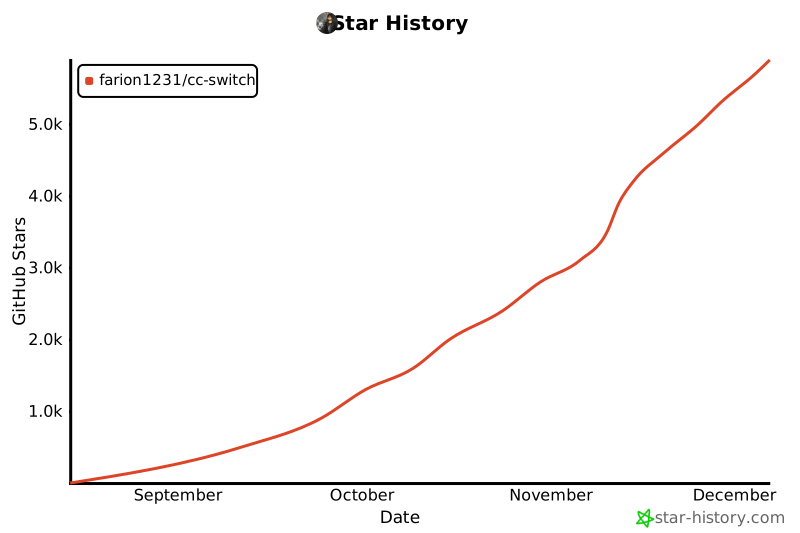](https://www.star-history.com/#farion1231/cc-switch&Date)
## License
MIT © Jason Young